
Picture this: your agent is trying to answer a pricing question. It has three datasets sitting in front of it — competitors, on-chain trades, and a customer CSV. The reflex most teams wire up is gut-level: stuff them all into the prompt and let the model figure it out. We've watched that reflex burn budgets in production, and it's exactly the problem EVIDIQ was built to fix.
At the data layer of the EVIDIQ MCP family, EVIDIQ Atlas handles the boring-but-critical middle job: giving an agent a way to query datasets from AI agents without dragging the whole table into the prompt. The answer comes back as a tight artifact, not a wall of text. While Sentinel checks whether an external agent is worth trusting and Notary receipts what a model produced, Atlas is the layer that actually moves data.
Here's the practical bit. We're going to walk through what an Atlas query actually looks like, why the per-call pricing model is the right default, and how it composes with the rest of the EVIDIQ surface.
Querying Datasets From an AI Agent, Defined
To query datasets from AI agents, the agent issues a structured request — typically a JSON-RPC call over MCP — to a data service and receives only the matched findings plus machine-readable artifacts. EVIDIQ Atlas is a pay-per-call implementation: the agent budgets the cost first, then spends one x402 call to get a focused answer.
Strip away the marketing and the definition is mechanical. An agent — the one running in your app — sends a parameterized request to a data service. The service does the heavy lifting: filtering, joining, aggregating, whatever the question demands. It returns a structured response: a JSON payload of findings, a small artifact (typically a chart spec or a CSV slice), and a receipt. The agent consumes the response, not the raw rows.
Why does this matter? Because the moment you stop shipping raw rows, four things get better at once:
- Latency drops. A 50-row artifact over MCP is faster than a 50,000-row prompt.
- Cost drops. You're paying for one tool call, not 30,000 input tokens.
- Accuracy holds. The model isn't tempted to hallucinate columns it doesn't see.
- Auditability rises. Every call returns a hash — you can prove what the agent actually saw.
The reason most teams don't build this isn't that it's hard. It's that the data lives somewhere inconvenient, and metering it cleanly is its own project. That's the gap Atlas was built to close.
The Context-Window Tax Nobody Budgets For
Let's do the math, because context-dumping is the wrong default and the numbers make it obvious.

Say your prompt currently embeds a 50,000-row dataset as a CSV. At a rough token ratio of four characters per token, that's somewhere around 12,000 tokens just for the data — before your system prompt, your tool list, your conversation history, or your actual question. On a 200K-context model, that single block consumes 6% of your context window for one dataset. Three datasets? You're past 18% before the model has read a single sentence of your instruction.
Now layer on the second cost nobody talks about: latency. Pushing 12,000 tokens through a frontier model takes time — easily 3-6 seconds before the first token of the answer arrives. If your agent is mid-conversation, that's a visible stall. Atlas collapses that to a single round-trip on a small payload, typically under 800ms for the network call plus the model's time on the returned artifact.
The third cost is the one engineers feel last and worst: accuracy drift. When the model sees too much data, it starts to interpolate. We've seen production agents confuse columns from two tables, confidently cite averages that don't exist, and "remember" rows that were never in the prompt. The fix isn't a better prompt. The fix is to ship less data and force the agent to ask for what it needs.
Counterintuitively, paying per call is cheaper than free access to a giant dataset. Free access to a giant dataset is an invitation to over-fetch. A priced call is a forcing function: the agent has to decide what it actually needs, and you get a clean line item on the bill. A wallet balance alone tells you nothing about intent — that's the gap Atlas closes.
One Question, One Priced Call
Let's walk a real query. Your agent wants to know: "Which of these three on-chain token datasets has the most consistent daily volume over the last 30 days?"
The naive path is to fetch all three, stuff them into the prompt, and ask the model to compare. The Atlas path is a three-call flow:
- Call
estimate_cost— free. The agent asks Atlas, "If I runquery_datasetfor dataset X with these filters, what will it cost?" Atlas returns a price quote in USDT0. No payment, no settle, just a number. The agent decides whether to proceed. - Call
query_dataset— paid. The agent sends the structured query. Atlas hits the data source, runs the filter, builds the artifact, and returns it. If the result set is empty, the cost is refunded. Honest pricing. - Call
compare_datasets— paid, only if needed. The agent ships the two returned artifacts to Atlas with a comparison question. Atlas runs the diff and returns a ranked answer plus a new artifact showing the comparison.
The wire format is JSON-RPC over the EVIDIQ MCP server at evidiq.dev/mcp. A real request looks like this:
{
  "method": "query_dataset",
  "params": {
    "dataset_id": "okx-spot-volume-30d",
    "filters": { "chain": "xlayer", "min_volume_usd": 1000000 },
    "limit": 50,
    "as": "artifact"
  }
}
The response is a small JSON object with the result rows, an artifact URL, and a receipt hash. The agent never sees the full historical table — it sees the 50 rows it asked for and a signed receipt that proves what was returned.
Here's the part that matters for budgets: the x402 challenge on the query_dataset call is settled in USDT0 on X Layer, and the payment is exact. The agent doesn't need to hold a balance. It signs an EIP-3009 transferWithAuthorization once, the facilitator settles it, and the call returns. No subscriptions, no API keys, no rate-limit tickets. You pay for what you use, and the price is visible before the spend. Honestly? This is the model most teams should have been building toward for years. Atlas just ships it.
Where Atlas Fits Next to Sentinel and Notary
A common question we get from builders is: "Do I need all three, or can I just use one?" The honest answer is they do different jobs, and the real value is in the composition.
Sentinel is the trust gate. Before your agent connects to an external service, you call verify_agent and get a 0-100 trust score with a recommendation. That's the upfront check — is this counterparty real, declared correctly, and behaving consistently? The detail is in the EVIDIQ Sentinel docs, but the short version is: Sentinel answers "should I trust this endpoint?"
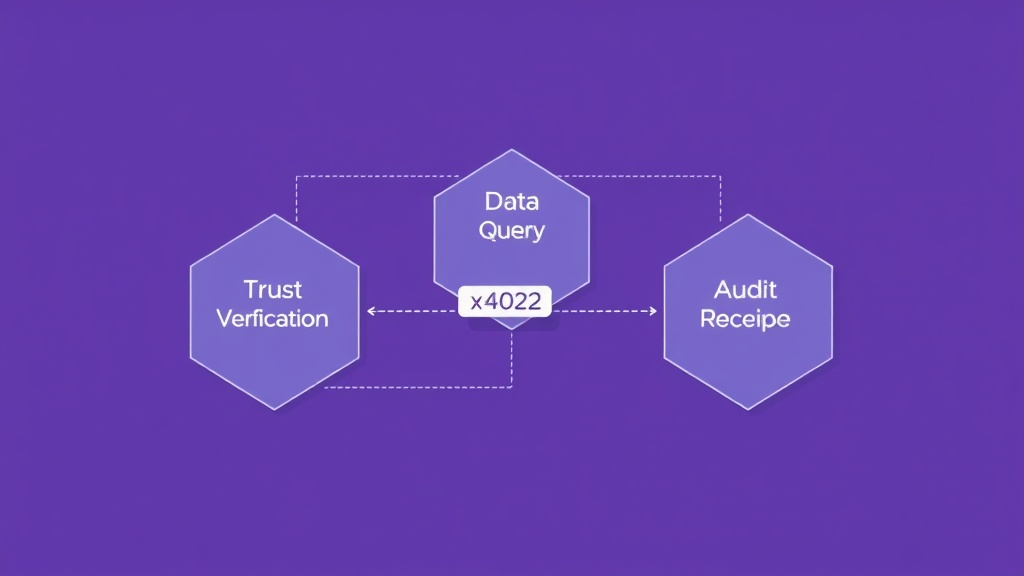
Atlas is the data layer. Once Sentinel gives you a green light, Atlas lets your agent actually pull structured data from that endpoint — or from any dataset you or your provider has registered — without dumping it into the prompt. Per-call, priced, receipted.
Notary is the audit trail. After the model produces an answer, Notary receipts it: a canonical hash of the output, an on-chain anchor on 0G Storage, and an EIP-191 signature from the EVIDIQ key. The EVIDIQ Notary docs walk through the schema, but the punchline is: anyone can re-fetch the receipt, re-hash the output, and confirm the signature.
The composition story is the part we care about. A typical EVIDIQ-backed agent flow looks like:
- Plan a task. The agent decides what data it needs.
- Verify the data source with Sentinel. Score 0-100, recommendation in hand.
- Query the dataset with Atlas, paying per call. Get a structured artifact.
- Reason over the artifact with the model. Generate an answer.
- Receipt the answer with Notary. Anchor it on 0G Storage. Sign it.
Every step is metered, every step is receipted, and the agent never carries more in its context than it needs. There's a deeper walkthrough of the orchestration in the EVIDIQ Operator docs, which is where most builder teams start. We built Atlas because we kept watching the same failure on production agents: the model hallucinating a dataset it had been shown in pieces, or burning five dollars on a prompt that should have cost five cents. The fix is structural, not prompt-level. The full surface is documented in the EVIDIQ docs, and the discovery endpoint at evidiq.dev/x402 lets any agent browse the available metered services.